Showing previous prompt in Claude Code
3/9/2026 at 7:07 pm pst
I wanted a quick way to show the last prompt I sent, so I added it to the status line.
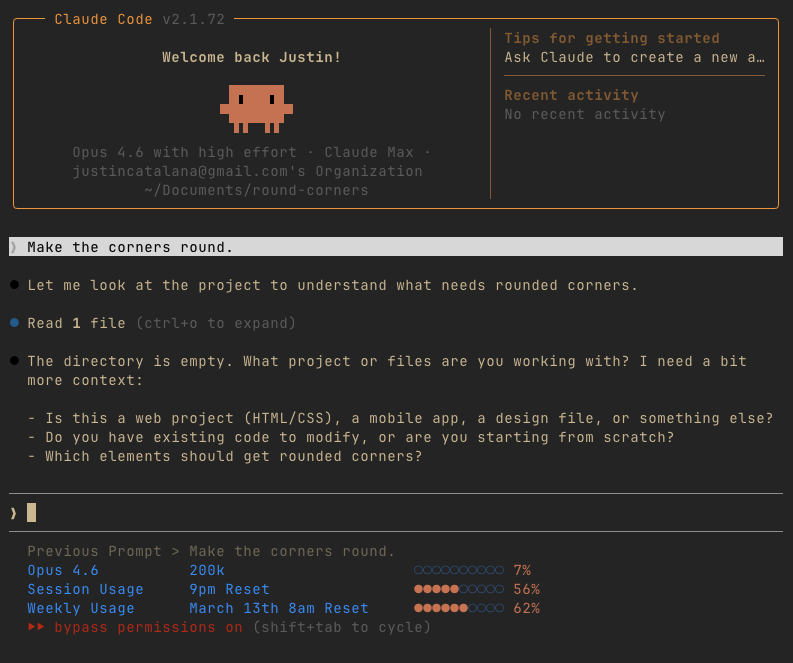 UserPromptSubmit fires every time you send a prompt. This script catches it and writes the text to a temp file keyed by session ID, so multiple terminals don't step on each other. Files are tiny and live in /tmp, so they get wiped on reboot.
Save to ~/.claude/hooks/save-last-prompt.sh:
UserPromptSubmit fires every time you send a prompt. This script catches it and writes the text to a temp file keyed by session ID, so multiple terminals don't step on each other. Files are tiny and live in /tmp, so they get wiped on reboot.
Save to ~/.claude/hooks/save-last-prompt.sh:
UserPromptSubmit fires every time you send a prompt. This script catches it and writes the text to a temp file keyed by session ID, so multiple terminals don't step on each other. Files are tiny and live in /tmp, so they get wiped on reboot.
Save to ~/.claude/hooks/save-last-prompt.sh:
#\!/bin/bash
set -f
mkdir -p /tmp/claude
input=$(cat)
session_id=$(echo "$input" | jq -r '.session_id // empty' 2>/dev/null)
prompt=$(echo "$input" | jq -r '.prompt // empty' 2>/dev/null)
if [ -n "$session_id" ] && [ -n "$prompt" ]; then
prompt=$(echo "$prompt" | sed 's/<[^>]*>//g' | sed 's/^[[:space:]]*//' | sed '/^$/d' | head -1)
[ -n "$prompt" ] && echo "$prompt" > "/tmp/claude/last-prompt-${session_id}.txt"
fi
echo '{}'
exit 0
chmod +x ~/.claude/hooks/save-last-prompt.sh
Add to ~/.claude/settings.json:
{
"hooks": {
"UserPromptSubmit": [{
"hooks": [{
"type": "command",
"command": "bash ~/.claude/hooks/save-last-prompt.sh",
"timeout": 5
}]
}]
}
}
Add to your statusline.sh:
session_id=$(echo "$input" | jq -r '.session_id // empty')
last_prompt=""
if [ -n "$session_id" ] && \
[ -f "/tmp/claude/last-prompt-${session_id}.txt" ]; then
last_prompt=$(head -c 200 \
"/tmp/claude/last-prompt-${session_id}.txt" \
2>/dev/null | tr '\n' ' ')
max_prompt_len=70
if [ ${#last_prompt} -gt $max_prompt_len ]; then
last_prompt="${last_prompt:0:$max_prompt_len}"
last_prompt="${last_prompt% *}..."
fi
fi
if [ -n "$last_prompt" ]; then
printf "\033[2;37mPrevious Prompt > ${last_prompt}\033[0m\n"
fi
-
Justin
#claude-code #status-line #messing-aroundGive Kudos (1)